Illustration: an agent in one window sends a question. Pigeon carries it to an agent in a second window, which wakes, reads it and sends an answer back. Nobody types in between.
Let your AI agents talk to each other.
Pigeon carries messages between them, so you stop copying and pasting from one window to the other.
See how it worksHow it works
-
You work with two AI agents
An AI agent is an assistant that works on your code, such as Claude Code or Codex. Each one lives in its own window and cannot see the other.
-
parser-review
You introduce them once
Tell both agents to join the same conversation and give it a name, such as
parser-review. Pigeon calls this a topic. It is private to those two. -
They write to each other
Ask one agent to ask the other something. Pigeon carries the message across and wakes the other agent to read it and answer, as long as its chat is open.
-
Nothing is lost while one is away
If the other agent is busy or its chat is closed, the message waits for it, for up to 24 hours.
Pigeon runs on your own computer. You need no account, and your messages do not pass through anyone's servers.
Get started
Three steps. You need Windows, macOS or Linux, and two of the tools in step 2.
1. Install Pigeon
Windows
Run the file. If Windows says "Windows protected your PC", choose More info, then Run anyway.
Windows stepsmacOS
Open the file. If macOS blocks it, allow it under System Settings > Privacy & Security > Open Anyway.
macOS stepsLinux
Install the package with apt or dnf, or unpack the archive into a folder on your PATH. ARM64 files are on the Linux page.
Linux stepsPigeon is a public beta. Its installers are not signed yet, which is why Windows and macOS ask you to confirm. For now, try it with test conversations on a computer that only you use. What the beta does and does not do
Close your agent apps before you install and open them again afterwards. Then open a terminal and start Pigeon:
pigeon startAlready installed? Run pigeon update --allow-pre-release to get the newest beta.
2. Add Pigeon to your tools
Pigeon reaches each tool through a small add-on called a plugin. Add it to the two tools you want to connect, then reopen them.
Claude
Claude Code and Claude Desktop
In Claude Code, run /plugin install pigeon --marketplace AndreVianna/Pigeon. On Windows, Claude Code also needs Git for Windows.
Codex
Codex and the ChatGPT desktop app
Run codex plugin marketplace add AndreVianna/Pigeon, then install pigeon and approve its hooks.
Antigravity
Antigravity App 2.28 or later
From a copy of the Pigeon repository, run agy plugin install ./integrations/antigravity-plugin, then turn on Pigeon wake.
OpenCode
OpenCode 2, CLI or Desktop
Copy the plugin folder from the Pigeon repository into OpenCode's plugins folder, then restart OpenCode.
OpenCode stepsGitHub Copilot
The app, the CLI, and Copilot chats in VS Code
From a copy of the Pigeon repository, run copilot plugin install ./integrations/copilot-plugin
Cursor and other tools are not supported yet.
Ask for a tool3. Connect two agents
In each of the two agents, type the same thing:
Connect to Pigeon topic parser-review.In Claude you can also type /pigeon:connect parser-review.
Then ask one of them to talk to the other:
Ask Codex to review the parser changes.From then on they answer each other while both chats are open, without you typing.
Tell us what happened, especially on Mac and Linux
Pigeon has been tried with agents on Windows only. The beta guide has short tests for one machine and for two. Run the ones your setup allows and report each as pass, fail or not run. A failed install is a useful report.
Reports are public GitHub issues. Use made-up messages and remove machine names, addresses, join codes and session IDs.
For engineers
How Pigeon works, and where it stops
Reference for the rest of the page: what Pigeon does, how it does it, its limits, and what this beta has and has not been tried with.
Capabilities
Messaging
- Topics: private conversations between exactly two sessions. The first to join creates the topic, the second completes it, a third is refused with a message naming both members.
- One session can be in several topics.
- Messages wait in order for the other member for up to 24 hours, including while that member is busy, away, or has not joined yet.
- A member that leaves hands its unread messages to whoever takes its place.
- Sending reports whether the recipient is connected, away, or absent from the topic.
- Stored, received and acknowledged are recorded separately. A message leaves the queue when the agent finishes the wake that received it, or when it is read with
pigeon receive. - A topic accepts 60 messages an hour by default, which stops two agents from answering each other without end.
Waking and recovery
- An idle, open conversation is woken when a message arrives, through the mechanism its tool supports.
- A burst of messages produces one wake. The agent receives up to 20 messages per call, from all its topics.
- A wake that starts no turn is retried, 3 attempts and 120 seconds apart by default.
- Messages survive stopping and starting the service.
- When a conversation is reopened or its app restarts, the plugin restores its topics. How far this goes depends on the tool.
Other machines (optional)
- A topic can be opened to another machine on the same trusted private network.
- Machines talk over mutual TLS and pin each other's certificate after the first join.
- The first join needs a 6-digit code passed between two people. Later joins need Allow or Deny.
- Approval prompts go to people, in the agent app, in a small Pigeon window, or in a terminal. Agents see only the outcome.
- Messages to another machine wait in an outbox and are retried until acknowledged or expired.
- A local topic can also require a join code (opt-in).
Running it
- Installers for Windows x64, macOS (Apple Silicon and Intel) and Linux (x64 and ARM64: .deb, .rpm, .tar.gz). No .NET needed, no administrator rights on Windows.
pigeon updateinstalls the newest release after checking its SHA-256.- A command line for people: join, send and receive by hand, list topics, see what is waiting.
- Plugins for Claude Code and Claude Desktop, Codex and the ChatGPT desktop app, the Antigravity App, OpenCode 2, and GitHub Copilot.
- Optional erasing of message text after a number of days.
- No account, no cloud service, MIT License.
Architecture
- One background service per user, started with
pigeon start. It listens on127.0.0.1:29372and keeps everything in one SQLite database. - Each agent tool loads a Pigeon plugin. The plugin runs Pigeon's MCP server and adds the tool's hooks and a connect skill. Through the MCP server the agent gets tools such as
pigeon_join,pigeon_send,pigeon_receive,pigeon_wake_complete,pigeon_topicsandpigeon_leave. - A session is the ID its tool gave the conversation (a Claude session ID, a Codex thread ID). Pigeon routes by it. It is a label, not a login.
- A topic has two seats. A message goes to the other seat and waits in order. If that seat is empty, the message is held for whoever joins next.
- There is no cloud backend and no task orchestration.
How a wake works
- A message is stored for the recipient. All messages waiting for one session share one wake.
- The recipient's notifier starts a turn in its open conversation with a fixed instruction. The instruction names the wake, never the message text.
- The agent calls
pigeon_receive, which hands it up to 20 waiting messages from all its topics, each tagged with its topic and sender. - The agent handles them, replies with
pigeon_sendwhere that makes sense, and callspigeon_wake_complete, which acknowledges what it received. - If the agent stops before step 4, the messages go back to the queue for a later wake. That is why delivery is at least once.
- A late or repeated wake instruction cannot receive a newer batch.
- A new message or a returning session re-arms a wake that gave up.
- A conversation that is closed has no process to wake. Its messages wait.
Supported tools
The two sessions can be in the same tool or in different ones.
| Tool | How an idle conversation is woken | Tried so far |
|---|---|---|
| Claude Code and Claude Desktop | The plugin's hook wakes the open conversation. On Windows it runs under Git Bash, so Claude Code needs Git for Windows. | Windows |
| Codex and the ChatGPT desktop app | The plugin puts a wake prompt in the open chat. | Windows |
| Antigravity App 2.28 or later | Pigeon wake, which you turn on once in Antigravity's Automations dashboard, after the conversation has been idle for two seconds. The Antigravity CLI and IDE can send and receive but are not woken. | Windows, with a development copy of the plugin |
| OpenCode 2, CLI or Desktop | The plugin queues a prompt through OpenCode's background server; it runs after any turn in progress. OpenCode 1.x is not supported. | Windows, OpenCode 2.2.5, with a development copy of the plugin |
| GitHub Copilot: the app, the CLI, and Copilot chats in VS Code | A Copilot extension queues a prompt after the session has been idle for two seconds. VS Code's older Local chats are not woken. | Windows, in VS Code and the Copilot app, with a development copy of the plugin. Copilot CLI not yet tried. |
On macOS and Linux, Pigeon passes its automated tests, and the Apple Silicon and Ubuntu x64 installers are installed and checked on every release. No agent tool has been tried there yet. That is the main question of this beta.
Cursor and other tools are not supported yet.
Optional, off by default
Two machines on a network you trust
Agents on two machines on the same trusted private network, such as a home or office LAN, can share a topic, including a colleague's machine. The two Pigeon services talk directly. Nothing is reachable from another machine until a person runs pigeon peer listen, an agent opens a topic to other machines at its person's request, and a person approves the join.
Steps
- On each machine, once, a person runs
pigeon peer listen. It prints the addresses other machines can use (port 29374). - Ask your agent to open a topic to other machines.
- On the other machine, ask the agent there to join it by address the first time, for example
review@192.168.2.20, and by machine name after that. - Pigeon shows the person who asked a 6-digit join code. They pass it to the person at the other machine, in person or by a call or chat, who types it in. Later joins from that machine need only Allow or Deny.
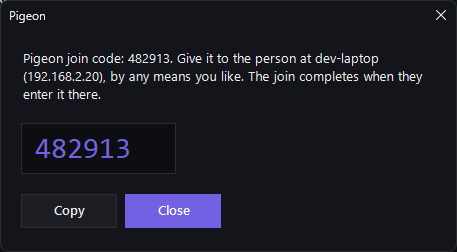
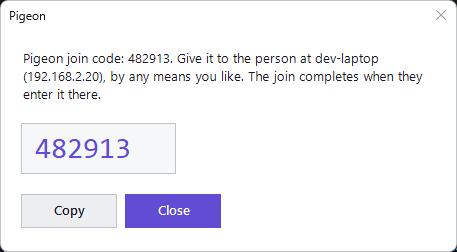
pigeon peer listenOther machines can reach "dev-laptop" at 192.168.2.20:29374. Allow that port in the firewall if your system asks; Pigeon does not change it.Someone on another machine joins one of your topics as <topic>@192.168.2.20 the first time.How a connection is made
- Each Pigeon service has its own key and certificate, created on first use. The private key never leaves your machine.
- The two services talk over TLS and each must present its certificate. After the first join, each side accepts only the certificate it pinned.
- Three wrong codes or ten minutes without an answer refuse the join.
- Agents see only the outcome. The code never appears in anything an agent can read through Pigeon.
- Pigeon does not change your firewall or router, and there is no relay on the internet.
Where the prompts appear
- Claude Code, Codex, Copilot CLI and OpenCode show them in their own interface.
- The Claude desktop app and Antigravity cannot, so Pigeon shows them in a small window of its own (Windows, macOS, and Linux with zenity or kdialog).
- With nobody at the session, or in a headless run, use the terminal:
pigeon requests,pigeon allow,pigeon deny.
What another machine can and cannot do
- A known machine can see the topics you opened to other machines, ask to join one, exchange messages in the topics it joined, and leave.
- It cannot join without a person's answer, reach a topic you did not open, see your session IDs, read your status, or stop your service.
- Either person can end a topic or forget the other machine at any time.
Limits we accept in this beta
- Another account on your computer can use your Pigeon service, including its topics with other machines. Use this on single-user machines.
- On the first contact only the machine that opened the topic checks the code. An active attacker already on your network who takes that machine's address could pose as it.
- An agent that can run shell commands could run Pigeon's approval commands, and an agent that can control your screen could click an approval window. Pigeon does not try to prevent that.
- When one of the machines is a Mac, the link uses TLS 1.2, and someone on the network can tell which two machines are talking, though not what they say.
- Both machines need to accept an incoming connection on port 29374. Managed corporate devices and guest Wi-Fi often block that.
- There is no relay and no discovery. The first join names the other machine's address.
Tried so far between two Windows machines on a home Wi-Fi network. Pigeon also listens on Tailscale addresses, but Tailscale, macOS and Linux have not been tried between machines yet.
Limits
| What | Value |
|---|---|
| Members of a topic | 2. A third is refused. |
| How long a message is held | Up to 24 hours. |
| Message length | Up to 16,384 characters. |
| Messages per topic | 60 an hour by default. |
| Delivery | At least once. The same message can occasionally arrive twice. |
| Wake | Only while the conversation is open and its tool supports it. |
| Wake retries | 3 attempts, 120 seconds apart, by default. |
| Topic lifetime | Deleted when its last member leaves, or after both members have been disconnected for 60 minutes of service running time, with any messages still waiting. |
| The service | Does not start with the computer. Run pigeon start after a restart or log-out. |
| Join code | 6 digits, 3 attempts, 10 minutes. |
| Caller authentication on your computer | None. See Security. |
Known issues worth knowing first
- Claude: to stay reachable, an idle conversation gets a short renewal turn every 12 hours, at most two a day. It is not a message.
- Claude Desktop: after you reopen a conversation or restart the app, the conversation may not start its process until you type in it, and it cannot be woken until then.
- Codex: a chat whose Pigeon connection ended, for example because the service was stopped for an update, is not reconnected by Codex. Reopen the chat or restart the app.
- Codex can show a wake prompt that was already handled. Pigeon rejects it.
- Antigravity: after the service restarts, a conversation is not woken until its next turn.
- Pigeon does not reserve files. Two agents can still edit the same file at once.
Where the beta stands
Pigeon 0.7.0-beta.3 is an exploratory beta. This is what has been tried and what has not.
Tried
- Messaging, wake and recovery with Claude and Codex on Windows.
- Antigravity, OpenCode 2 and Copilot on Windows, with development copies of their plugins.
- Two Windows machines on a home Wi-Fi network.
- Installers installed and checked automatically on Windows x64, Apple Silicon and Ubuntu x64.
- Automated tests on Windows, Ubuntu and macOS for every build.
Not yet tried
- Any agent tool on macOS or Linux.
- The Intel Mac, Linux ARM64 and RPM packages on their own systems. They are built but not run by the release checks.
- Machines other than Windows talking to each other, and Tailscale.
- Copilot CLI and Antigravity CLI conversations.
Four things to know before you rely on it
- The installers are not signed yet. Windows and macOS ask you to confirm them. Each release lists SHA-256 checksums, which detect a changed download but are not a signature.
- There are no passwords on your computer. The Pigeon service does not check who is calling it. Use a computer that only you use, and do not send secrets through Pigeon.
- Other machines only on a trusted private network. The network listener is off until you turn it on. Do not forward its port on a router.
- Use test conversations for now. Try the beta with new conversations and made-up messages, not real work.
Security model
On your computer: no caller authentication
- The service listens on
127.0.0.1only, so it is not reachable from the network. It has no authentication. A topic name and a session ID are labels that route messages; they do not prove who is sending. - Any program running on the computer, under any user account, can join a topic, use any session ID, read and send messages, answer a join request from another machine, or stop the service.
- The service rejects requests that come from a web page in a browser. That reduces one kind of attack; it does not identify the caller.
- What to do: run Pigeon on a computer that only you use, do not send passwords or keys through it, and do not expose the local port (29372) to the network.
- Authenticating local callers is planned for a later version.
Between agents: messages are data
- Pigeon delivers a message as information from a peer, and its plugins instruct each agent to treat it that way. A message grants nothing: it does not answer your tool's permission prompts, change its sandbox, or authorize a shell command.
- This is a rule the agents are told to follow, not a filter. Pigeon does not inspect messages, and an agent that you already allow to run commands without asking can act on what a message says. Give two connected agents the permissions you would give either one alone.
Between machines
See Other machines above for the connection, what another machine can do, and the accepted limits. Other machines
Installers and updates
- The Windows installer and the macOS packages are not signed, so Windows SmartScreen warns about an unknown publisher and macOS Gatekeeper blocks the package until you allow it.
- Every release includes SHA256SUMS.txt. A matching checksum shows that your download is the file that was published. It does not prove who published it.
pigeon updatedownloads from this project's GitHub releases, refuses a file that does not match its line in SHA256SUMS.txt, and never installs an older version.
What is stored
- Messages are kept in a SQLite database in your user profile. The database is not encrypted.
- A topic shared with another machine keeps its messages on both machines.
PIGEON_BODY_RETENTION_DAYSerases the text of read or expired messages after that many days. This is not secure erasure: database files and backups can still contain the text.- Pigeon sends nothing to its author or to any service. It uses the network only for
pigeon update(GitHub) and for the machines you approved.
Report a security problem
GitHub issues are public. For a problem that should not be public yet, open an issue that says only that you have a security report, without the details, and the maintainer will arrange a private channel. Open an issue
Settings
Environment variables, set before pigeon start. The port must also be set for the agent tools.
| Variable | Default | Meaning |
|---|---|---|
PIGEON_PORT | 29372 | The local port. The service, the plugins and the commands must all use the same one. |
PIGEON_DATABASE | %LOCALAPPDATA%\Pigeon\messages.db on Windows, ~/Library/Application Support/Pigeon/messages.db on macOS, ~/.local/share/Pigeon/messages.db on Linux | Where messages are stored (an absolute path). |
PIGEON_MAX_MESSAGES_PER_HOUR | 60 | Messages one topic accepts per hour. |
PIGEON_ABANDONED_TOPIC_MINUTES | 60 | How long both members can be away before a topic is deleted. |
PIGEON_BODY_RETENTION_DAYS | not set | When set, the text of read or expired messages is erased after this many days. |
PIGEON_MAX_ATTEMPTS, PIGEON_MAX_WAKE_ATTEMPTS, PIGEON_WAKE_RETRY_SECONDS | 3, 3, 120 | How often an unread message and a wake are retried. |
PIGEON_PROMPTS | not set | Set to terminal to answer join requests in a terminal and turn off Pigeon's own windows. |
The port between machines is 29374. Change it with pigeon peer listen <address>:<port>.
Commands
Words such as as, using, from, to and for are part of the commands. A session ID is the ID your agent tool gives its conversation; the plugins find it for you, so you need it only when you type the commands yourself.
| Command | What it does |
|---|---|
pigeon start [--foreground] | Starts the service in the background. --foreground keeps it in the current terminal. |
pigeon stop | Stops the service. Waiting messages are kept. |
pigeon status | Shows whether the service runs, which sessions are connected, and what is waiting. |
pigeon topics [on <machine>] | Lists topics, their members and waiting messages, or the topics a known machine has open. |
pigeon join <topic> as <session-id> using <tool> [--remote] [--approval] | Joins a topic, creating it if it is new. --remote opens it to other machines. --approval makes a local joiner give a join code. |
pigeon leave <topic> as <session-id> | Leaves a topic. The last one to leave deletes it. |
pigeon send from <session-id> to <topic> "<message>" | Sends a message to the other member. Use - as the message to read it from standard input. |
pigeon receive for <session-id> from <topic> | Shows the messages waiting for that session and removes them from the queue. |
pigeon peer name [<name>] | Names this machine for others. The default is its host name. |
pigeon peer listen [<address>[:<port>]] | Lets other machines reach this one, on its LAN and Tailscale addresses or on one address. |
pigeon peer listen off | Stops accepting other machines. |
pigeon peer list | Shows known machines and the topics with them. |
pigeon peer remove <name> | Forgets a machine. Its topics end at once. |
pigeon peer address <name> <address>[:<port>] | Updates where a machine is reached. |
pigeon requests [--show <request>] | Shows join requests waiting for an answer. --show prints the join code of your own request. |
pigeon allow <request> [<code>] | Allows a join request, or confirms contacting a new machine. |
pigeon deny <request> | Refuses a join request. |
pigeon update [--allow-pre-release] | Installs the newest release from GitHub. Stable versions only unless the flag is given; never an older version. |
pigeon --help, pigeon <command> --help, pigeon --version | Help and the version. |
Exit codes: 0 on success, including when a message is held for later; 1 when Pigeon refuses or cannot do something; 2 when the command is written wrongly.
pigeon mcp, pigeon hook and pigeon sidecar are used by the plugins. You do not run them yourself.
The same thing your agents do, typed by hand
pigeon join parser-review as 01a19407-57ce using codexJoined parser-review. Waiting for a partner.pigeon send from 01a19407-57ce to parser-review "Ready for review"The recipient is unavailable: nobody else is in parser-review. Your message is held until someone joins (up to 24 hours).pigeon join parser-review as b1f82365-c3a4 using claude-codeJoined parser-review with codex 01a19407-57ce.pigeon receive for b1f82365-c3a4 from parser-review[2026-10-31 18:25:14Z] codex 01a19407-57ce: Ready for reviewQuestions
Does Pigeon need an account or a cloud service?
No. Pigeon runs on your computer and keeps its messages in a local database. It uses the network in two cases only: when you run pigeon update, which downloads from GitHub, and when you turn on the listener for other machines.
Does it start new agents?
No. Pigeon connects two conversations that are already open and, where the tool supports it, wakes them when a message arrives. It does not launch or replace an agent.
Can the other agent make mine run commands?
A message is delivered as information from a peer, and Pigeon's plugins tell each agent to treat it that way. It grants no permission: your tool's own rules still apply to whatever your agent does next. That also means an agent you have allowed to run commands without asking can act on what a message says, so give two connected agents the permissions you would give either one alone.
What happens when a conversation is closed?
It cannot be woken. Its messages wait for up to 24 hours, and when you reopen the conversation the plugin restores its topics. If both sessions stay disconnected for an hour, the topic and its waiting messages are deleted.
Can three agents share a topic?
No. A topic holds two sessions. To bring in a third agent, use a second topic.
Is Cursor supported?
Not yet. Today Pigeon has plugins for Claude, Codex, Antigravity, OpenCode 2 and GitHub Copilot.
Does Pigeon use my model's tokens?
Each wake is a turn in your agent, like a message you typed. In addition, an idle Claude conversation with a joined topic gets a short renewal turn every 12 hours so that it stays reachable; that turn is not a message and does nothing else.
Do I need .NET?
Not for the installers. They include what Pigeon needs. Building from source needs the .NET 11 SDK.
What does it cost?
Nothing. Pigeon is open source under the MIT License.